
# LG Update Blocker
A webOS homebrew app that gets rid of the *"a new software version is
available"* popup LG shows on every boot — without touching the firmware
itself, and fully reversible.
Built for a rooted **LG CX (webOS 5)**, but nothing in it is model specific: it
only ever probes for things and acts on what it actually finds on your TV.
## Why blocking the update servers is not enough
Blocking `snu.lge.com` in `/etc/hosts` is the obvious fix, and it is what the
Homebrew Channel's own *Block system updates* toggle does. On a CX it does not
stop the boot popup, and it took a session on the TV to work out why.
`/usr/sbin/update` is started by **systemd** (`update.service`, pulled in by
`webos-mbd.target`) and runs its version check against
`https://snu.lge.com/CheckSWAutoUpdate.laf` roughly **20 seconds before** the
Homebrew Channel gets as far as running its `init.d` hooks. So on every boot
the check reaches a real LG server, gets `RESULT_CD 900 / Success` back, and
the popup is already on screen by the time any hosts entry exists:
```text
00:20:52 [tNsuMainTask] pRequestUpdateUrl - https://snu.lge.com/CheckSWAutoUpdate.laf
00:20:52 [updateTimer] NSU_CreateUpdateAlert - "…Version: 04.64.00…"
00:21:11 lg-update-blocker: hosts entries added ← 19 seconds too late
```
Losing that race is not fixable from userspace. Every directory systemd reads
units from is a read-only overlay except `/run/systemd/system`, which is tmpfs
and created after the updater has already gone. Nor is there a setting that
gates the check — `automaticUpdate`, `support/softwareUpdateEnable`,
`hotelMode/swUpdateEnable` and the `.UpdateIsInprogress` flag were each tested
by restarting the daemon and counting the requests it made, and none of them
stop it.
So this app **closes the popup** instead of trying to prevent it, and blocks
the hostnames to stop the download and every later check in the session. Two
things also turned out not to be true, and the app no longer pretends
otherwise: the popup is not caused by a staged firmware image (the staging
directory is empty at boot; the size the daemon reports is in-memory only), and
it is not caused by an update *service* that can be stopped — `/etc/init` is
dead upstart leftovers on a systemd TV, and `initctl stop update` silently
"succeeds" while doing nothing.
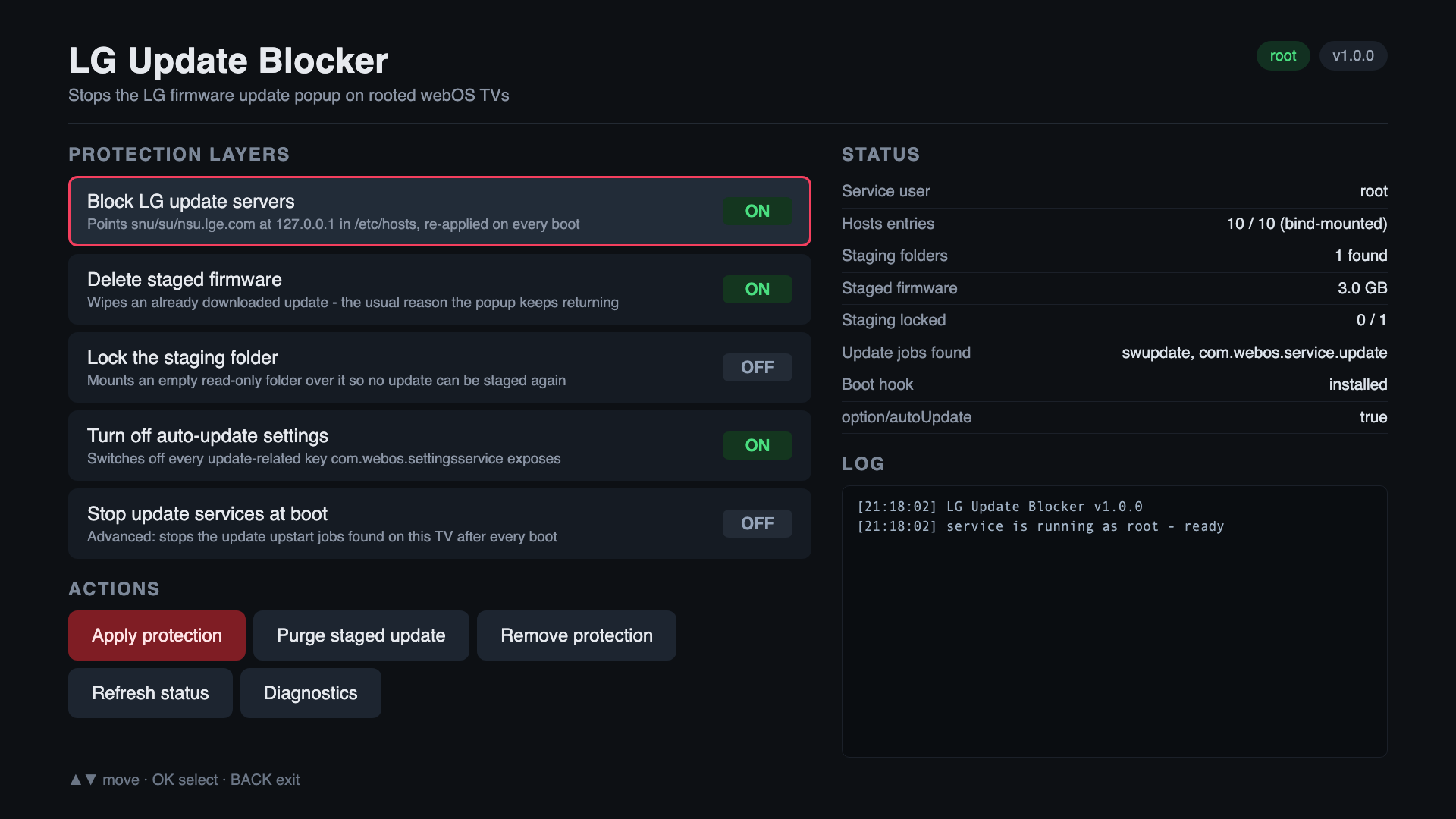
## Protection layers
| Layer | What it does | Default |
| --- | --- | --- |
| **Block LG update servers** | Points `snu`/`su`/`nsu.lge.com`, their TLS variants, the `-dev` fallbacks and the CDN aliases at `127.0.0.1` in `/etc/hosts` | on |
| **Close the update popup** | Closes the alert the updater raised during boot, then stays subscribed to `com.webos.notification` and closes any later one as it opens | on |
| **Delete staged firmware** | Wipes the update image staged in `/mnt/lg/cmn_data/swupdate` if the TV ever does download one | on |
| **Lock the staging folder** | Bind-mounts an empty read-only directory over it, so nothing can be staged again | off |
| **Turn off auto-update settings** | Reads every `com.webos.settingsservice` category, switches off each update-related key it finds, and remembers the original values. On a CX this includes `hotelMode/swUpdateEnable`, which also hides the *Software Update* menu until you revert | on |
Every layer is undone by **Remove protection**, which also restores the
settings from the backup it made.
Be honest about what this buys you: the popup is closed within a fraction of a
second of the Homebrew Channel starting its hooks, but the updater raised it
15–20 seconds earlier, so on a cold boot **you will see it appear and then
vanish by itself**. It is gone before you can act on it, and you never have to
dismiss it. The hook is installed as `00-lgupdateblocker` so `run-parts` runs
it before the other homebrew hooks, which is as early as anything unprivileged
can go. Measured on a CX: alert raised at `01:26:22`, closed at `01:26:37`.
## Requirements
* A rooted webOS TV with the [Homebrew Channel](https://github.com/webosbrew/webos-homebrew-channel)
installed and its root status showing **ok**.
* The app's own service needs root. On first launch it asks the Homebrew
Channel to elevate it (`elevateService`, falling back to running
`elevate-service` through `exec`), then restarts itself. The header badge
turns green when it worked.
## Install
### Through the Homebrew Channel (repository)
Add the repository once — *Homebrew Channel → Settings → Add repository*:
```text
https://git.crylia.de/Crylia/lg_update_blocker/releases/download/latest/apps.json
```
The app then shows up in the Homebrew Channel list, and every new release that
is tagged is picked up automatically — Gitea resolves `.../download/latest/...`
to the newest release.
### Manually
Download the `.ipk` from the release and:
```sh
ares-install com.rkievits.lgupdateblocker__all.ipk
ares-launch com.rkievits.lgupdateblocker
```
## Using it
Navigate with ▲▼, select with OK, leave with BACK.
1. Check the layers you want (the defaults are a good start).
2. **Apply protection** — the log pane shows exactly what was changed.
3. Reboot and confirm the popup is gone.
Other buttons: **Purge staged update** (wipe a downloaded image right now),
**Remove protection** (undo everything), **Refresh status**, and
**Diagnostics** (dumps OS info, mounts, discovered settings, the tail of
`/etc/hosts` and the boot-hook log — handy for a bug report).
## What it touches
| Path | Purpose |
| --- | --- |
| `/etc/hosts` | Blocked hostnames, between `# >>> lg-update-blocker >>>` markers. Bind-mounted from `/tmp/lgupdateblocker-hosts` because `/` is read-only |
| `/var/lib/webosbrew/init.d/00-lgupdateblocker` | Boot hook, run by the Homebrew Channel startup script; re-applies the enabled layers. The `00-` prefix makes `run-parts` run it first |
| `/var/lib/webosbrew/lgupdateblocker/` | `config.json`, `hosts.txt`, `settings-backup.json`, `boot.log`, `alert-watch.sh` |
| `/tmp/var/log/update.log` | Read only — the updater logs the id of the alert it raised, which is the only way to close a popup that opened before we were subscribed |
| `/mnt/lg/cmn_data/swupdate` | Staged firmware, emptied (and optionally locked) |
Nothing is written to system partitions, and no LG binaries are patched or
replaced.
## Troubleshooting
* **Badge says "no root"** — open the Homebrew Channel, verify *Root status* is
`ok`, then relaunch this app. If the Homebrew Channel itself is unelevated,
fix that first (its Settings screen has a button for it).
* **Popup still appears after a reboot** — run *Diagnostics* and look at the
boot-hook log at the bottom. It records, per boot, whether the hosts entries
were added, what was purged, and the id of the popup it closed. If there is
no `dismissed update popup …` line, check `updateLog` in the same dump for
`_gAlertWindowId` — if that is missing too, your TV raises the alert by some
other route and the diagnostics dump is what to open an issue with.
* **The popup appears for ~15 seconds, then disappears on its own** — expected, see
[Why blocking the update servers is not enough](#why-blocking-the-update-servers-is-not-enough).
Nothing running after the Homebrew Channel can beat the updater to it.
* **Belt and braces** — a hosts file only helps if the TV uses DNS. Blocking
`snu.lge.com`, `su.lge.com` and `nsu.lge.com` on your router or Pi-hole as
well is the one measure that also survives a factory reset.
* **Forced *app* updates** (the *"You must update this app to launch it"*
dialog) are a different mechanism — that is what
[LG App Update Blocker](https://github.com/dr0dr1dr2dr3/lgappupdateblocker)
is for. This app deliberately leaves the `lgtvsdp.com` hosts alone, since
blocking those also breaks the store and several other services.
## Building
No bundler, no runtime dependencies — `tools/build.js` copies `app/` and
`service/` into `build/` and substitutes the app id and version.
```sh
npm install # only the ares CLI
npm run dist # build + package + manifest, output in dist/
npm run deploy # ares-install the resulting ipk
```
## Releasing
[.github/workflows/release.yml](.github/workflows/release.yml) builds on every
push (Gitea Actions reads `.github/workflows/` too). Tag a commit `v`
(matching `version` in `package.json`) and the workflow additionally publishes a
release containing:
* `com.rkievits.lgupdateblocker__all.ipk`
* `com.rkievits.lgupdateblocker.manifest.json` — Homebrew Channel manifest,
with the absolute ipk URL, its sha256 and size
* `apps.json` — the one-package repository index used by the repository URL above
* `description.html` — the long description shown in the Homebrew Channel
Uploading is done by [tools/release-gitea.js](tools/release-gitea.js) against
the Gitea API (`softprops/action-gh-release` only speaks to github.com). It is
idempotent: re-running a tag reuses the release and replaces the attachments.
The URLs inside the manifest come from `PUBLIC_SERVER_URL` in the workflow, not
from `GITHUB_SERVER_URL` — the runner is handed the instance's internal LAN
address, which the TV cannot reach. Change that one variable if the instance
moves. Generating for github.com instead works too: `--server` (or
`PUBLIC_SERVER_URL`) switches the "latest release asset" URL to GitHub's shape.
The app id lives in exactly one place: the `name` field of `package.json`.
Change it there and everything (appinfo, service name, Luna URIs, manifest)
follows.
## License
MIT